Analytics, Billing, Statements, and Settlements
Understand what sold, what changed, and what you are owed.
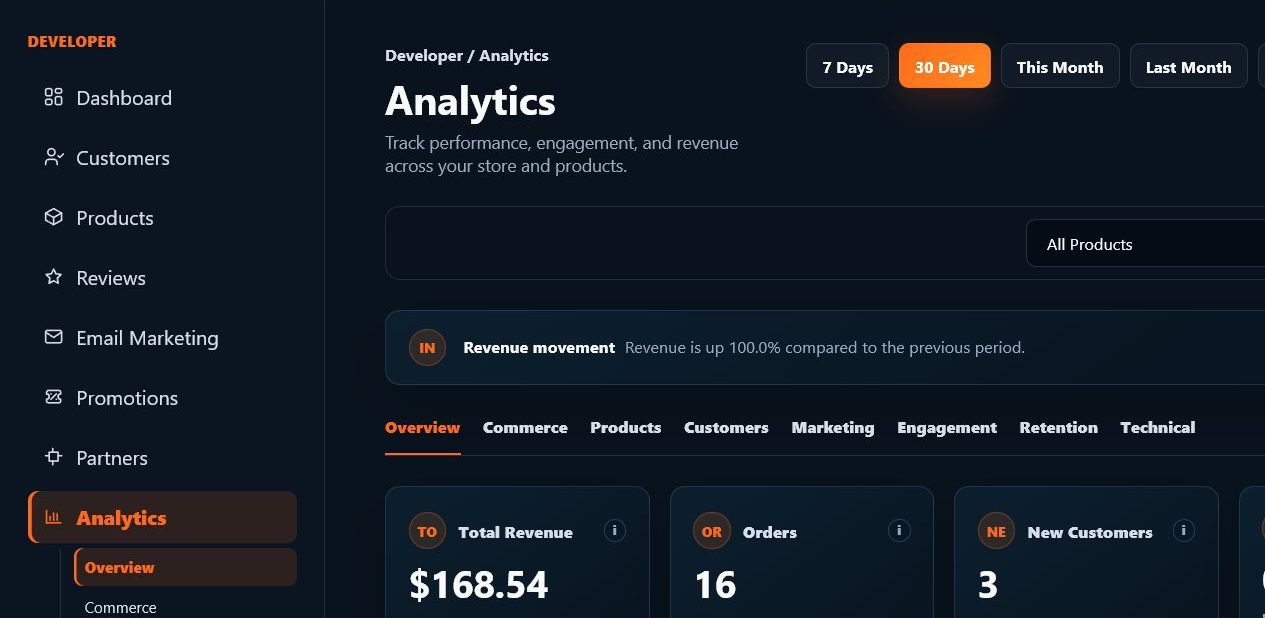
SoundSync operations pages track revenue, product performance, orders, subscriptions, promotions, marketplace attribution, fees, statements, settlements, payout readiness, refunds, disputes, and team access boundaries.
SoundSync
Launch health and revenue share one operating view
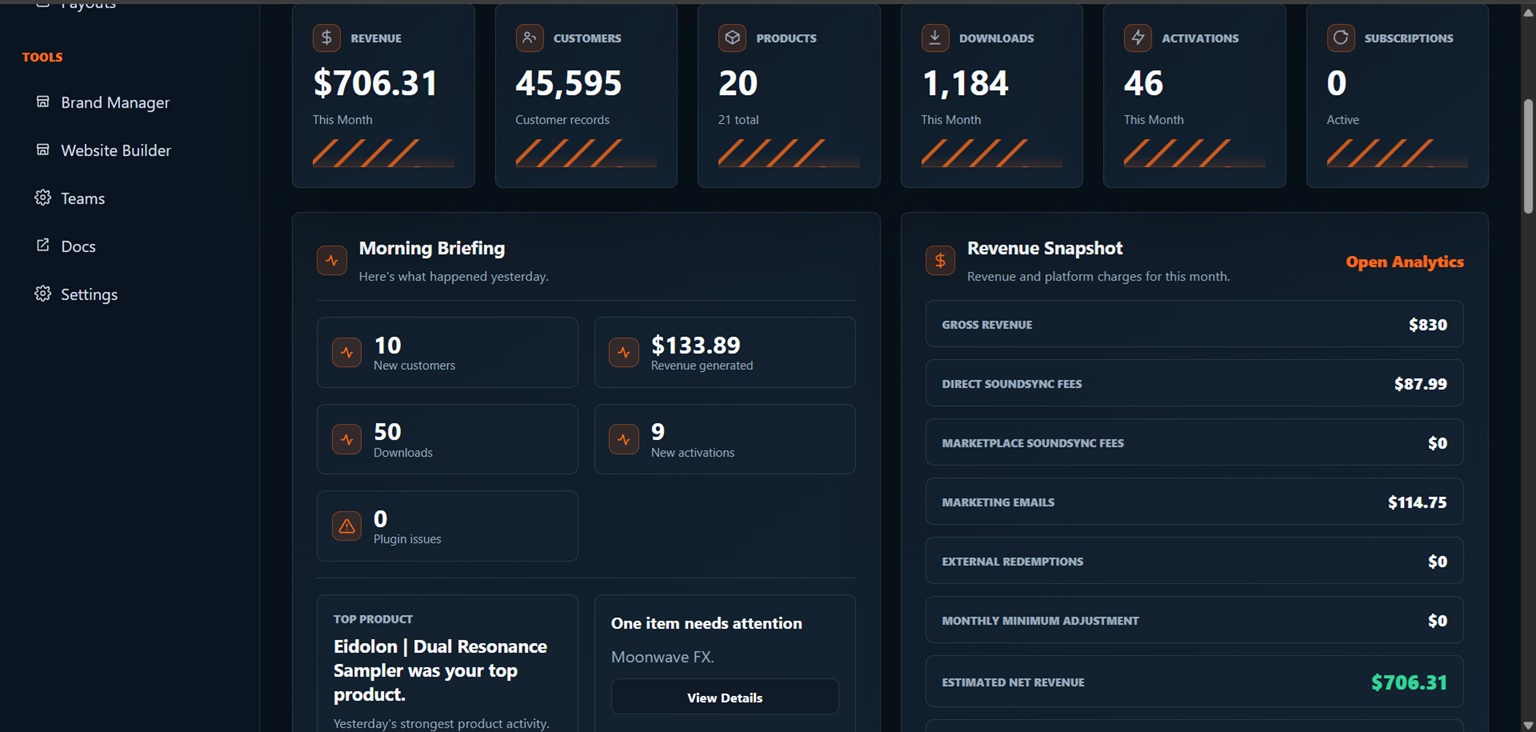
The newer developer dashboard screenshot shows revenue, product count, customers, activations, monitoring, and readiness context in the dark dashboard experience.
SoundSync
Revenue overview
Revenue overview is documented around the workflow it belongs to and the boundary developers need to understand.
Workflow fit
Place revenue overview inside the surrounding SoundSync path instead of treating it as an isolated feature.
Boundary
Explain what SoundSync handles, what the developer still owns, and what should not be promised publicly.
Follow-through
Point the page toward the next setup, docs, reporting, or support action that naturally follows revenue overview.
SoundSync
Product performance
Product performance has to earn its place on the page by explaining a real product-business outcome.
What changes
State the concrete behavior product performance changes for setup, checkout, access, delivery, growth, or support.
Why it matters
Tie product performance to a developer or customer problem that would otherwise require manual work or disconnected tools.
How it stays visible
Show where status, activity, reporting, or documentation keeps product performance reviewable after release.
SoundSync
Orders and transactions
Orders and transactions sits in the money-to-access chain, so the page needs to make the commercial effect plain.
Money movement
Explain how checkout, provider events, taxes, fees, refunds, disputes, reserves, or settlement state affect the transaction.
Access impact
Connect the commercial state to orders, entitlements, subscriptions, downloads, customer library, and plugin validation.
Developer visibility
Show what developers can reconcile through revenue views, billing surfaces, statements, activity, or operational reports.
SoundSync
Subscriptions
Subscriptions extends product access across recurring billing and plan changes.
Plan structure
Define monthly, annual, bundle, trial, renewal, and product-access rules before the offer is published.
Lifecycle state
Reflect active, past-due, canceled, expired, upgraded, downgraded, or scheduled-change state in checkout, library, and licensing surfaces.
Customer and developer view
Show customers what access they have while giving developers reporting, failed-payment, and lifecycle context.
SoundSync
Promotions
Promotions is part of the growth system, where offers and communication must stay tied to consent, storefront context, and reporting.
Campaign intent
Create campaigns, offers, scheduled deals, promo codes, or audience selections around a clear product or customer moment.
Eligibility and consent
Respect contact ownership, suppression, unsubscribe state, offer eligibility, redemption limits, and platform audience boundaries.
Performance loop
Use reports, attributed revenue, send activity, campaign status, and storefront behavior to understand what happened after launch.
SoundSync
Marketplace
Marketplace shapes how customers discover, evaluate, and buy audio software through SoundSync.
Discovery surface
Use product media, categories, search, reviews, pricing, deals, and developer brand context where that surface supports it.
Buying path
Carry customers from browse or embed context into cart, checkout, account, downloads, serials, subscriptions, and support.
Attribution and limits
Track marketplace or storefront context without promising guaranteed placement, traffic, sales, or unrestricted customer contact data.
SoundSync
Fees
Fees sits in the money-to-access chain, so the page needs to make the commercial effect plain.
Money movement
Explain how checkout, provider events, taxes, fees, refunds, disputes, reserves, or settlement state affect the transaction.
Access impact
Connect the commercial state to orders, entitlements, subscriptions, downloads, customer library, and plugin validation.
Developer visibility
Show what developers can reconcile through revenue views, billing surfaces, statements, activity, or operational reports.
SoundSync
Statements
Statements sits in the money-to-access chain, so the page needs to make the commercial effect plain.
Money movement
Explain how checkout, provider events, taxes, fees, refunds, disputes, reserves, or settlement state affect the transaction.
Access impact
Connect the commercial state to orders, entitlements, subscriptions, downloads, customer library, and plugin validation.
Developer visibility
Show what developers can reconcile through revenue views, billing surfaces, statements, activity, or operational reports.
SoundSync
Settlements
Settlements sits in the money-to-access chain, so the page needs to make the commercial effect plain.
Money movement
Explain how checkout, provider events, taxes, fees, refunds, disputes, reserves, or settlement state affect the transaction.
Access impact
Connect the commercial state to orders, entitlements, subscriptions, downloads, customer library, and plugin validation.
Developer visibility
Show what developers can reconcile through revenue views, billing surfaces, statements, activity, or operational reports.
SoundSync
Payout readiness
Payout readiness sits in the money-to-access chain, so the page needs to make the commercial effect plain.
Money movement
Explain how checkout, provider events, taxes, fees, refunds, disputes, reserves, or settlement state affect the transaction.
Access impact
Connect the commercial state to orders, entitlements, subscriptions, downloads, customer library, and plugin validation.
Developer visibility
Show what developers can reconcile through revenue views, billing surfaces, statements, activity, or operational reports.
SoundSync
Refunds and disputes
Refunds and disputes sits in the money-to-access chain, so the page needs to make the commercial effect plain.
Money movement
Explain how checkout, provider events, taxes, fees, refunds, disputes, reserves, or settlement state affect the transaction.
Access impact
Connect the commercial state to orders, entitlements, subscriptions, downloads, customer library, and plugin validation.
Developer visibility
Show what developers can reconcile through revenue views, billing surfaces, statements, activity, or operational reports.
SoundSync
Team access boundaries
Team access boundaries protects developer accounts, customer information, and staff access as the business grows.
Access boundary
Limit visibility by workspace, role, product scope, sensitive permission, session state, and credential responsibility.
Privacy expectation
Keep customer data, screenshots, exports, support context, and account information scoped to the people who need it.
Review trail
Use audit activity, session revocation, permission checks, and operational review so access changes are explainable later.
SoundSync
Product proof
Screenshots and diagrams are placed near the workflows they explain, so visitors see the actual SoundSync surfaces instead of abstract feature claims.
Questions developers ask
Is SoundSync only for plugins?
No. SoundSync supports plugins, instruments, sample libraries, digital downloads, subscriptions, and custom audio tools.
Can I use my own site?
Yes. You can use hosted storefronts, embedded storefronts, standalone embeds, and custom domains depending on the surface you choose.
Does marketplace attribution add another fee?
No. SoundSync uses one 10% fee on SoundSync-processed sales, including marketplace-attributed sales.
Understand what sold, what changed, and what you are owed. belongs in one connected launch system.
Move from setup to customer access, growth, trust, and operations without rebuilding the business around disconnected services.