Customer library guide
HISE My Products
Authenticated owned-product access, downloads, serial/device context, and subscription visibility.
Use customer identity, not developer access
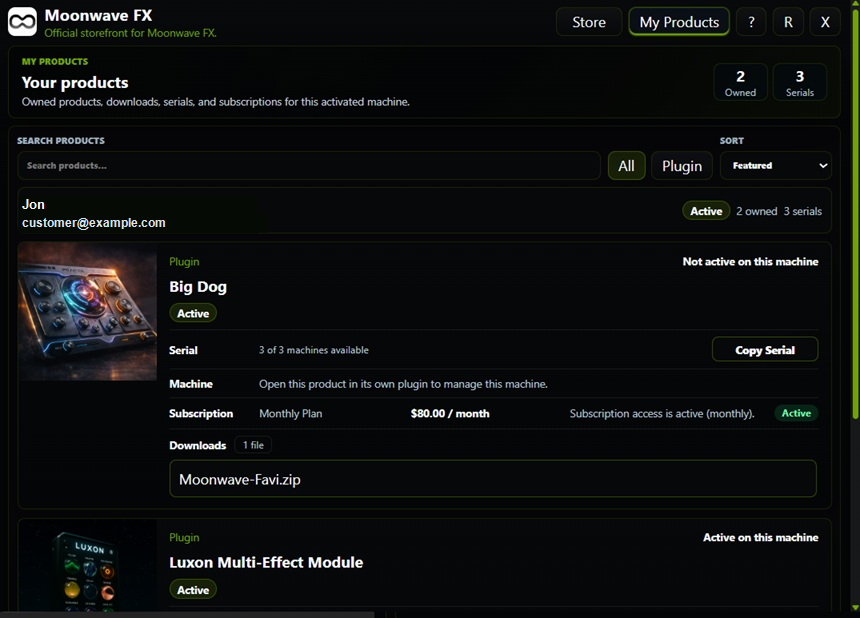
My Products opens the authorized customer-library surface. The customer sees supported owned products, eligible delivery, serial/license information, device actions, subscription context, and support destinations. Do not ship a developer session token to open this view.
Ownership and machine state are different
An owned product can require device activation before audio access. Deactivating one machine does not erase the customer's purchase. Likewise, a portal session expiring does not itself revoke or authorize plugin processing.
SoundSync
Test customer access
-
Owned and unowned products
Verify the library follows entitlement and does not expose another customer's products.
-
Files
Confirm the relevant product/version download is authorized.
-
Device controls
Exercise permitted deactivation and the resulting licensing UI.
-
Subscriptions
Check the supported recurring status and current access period.
-
Session expiry
Renew the permitted customer browsing session instead of reusing developer credentials.
-
Privacy
Sanitize customer names, emails, serials, and tokens in screenshots and logs.
SoundSync
My Products customer access
The My Products capture shows sanitized customer identity, owned products, serial counts, downloads, subscription visibility, and machine state.